Mileage log for iPhone

Every business mile counts.

A mileage log that lives on your iPhone. One tap to record, a swipe to classify, a report for your accountant.
  • Free, with no trip limit
  • No account
  • iPhone, iOS 26 or later
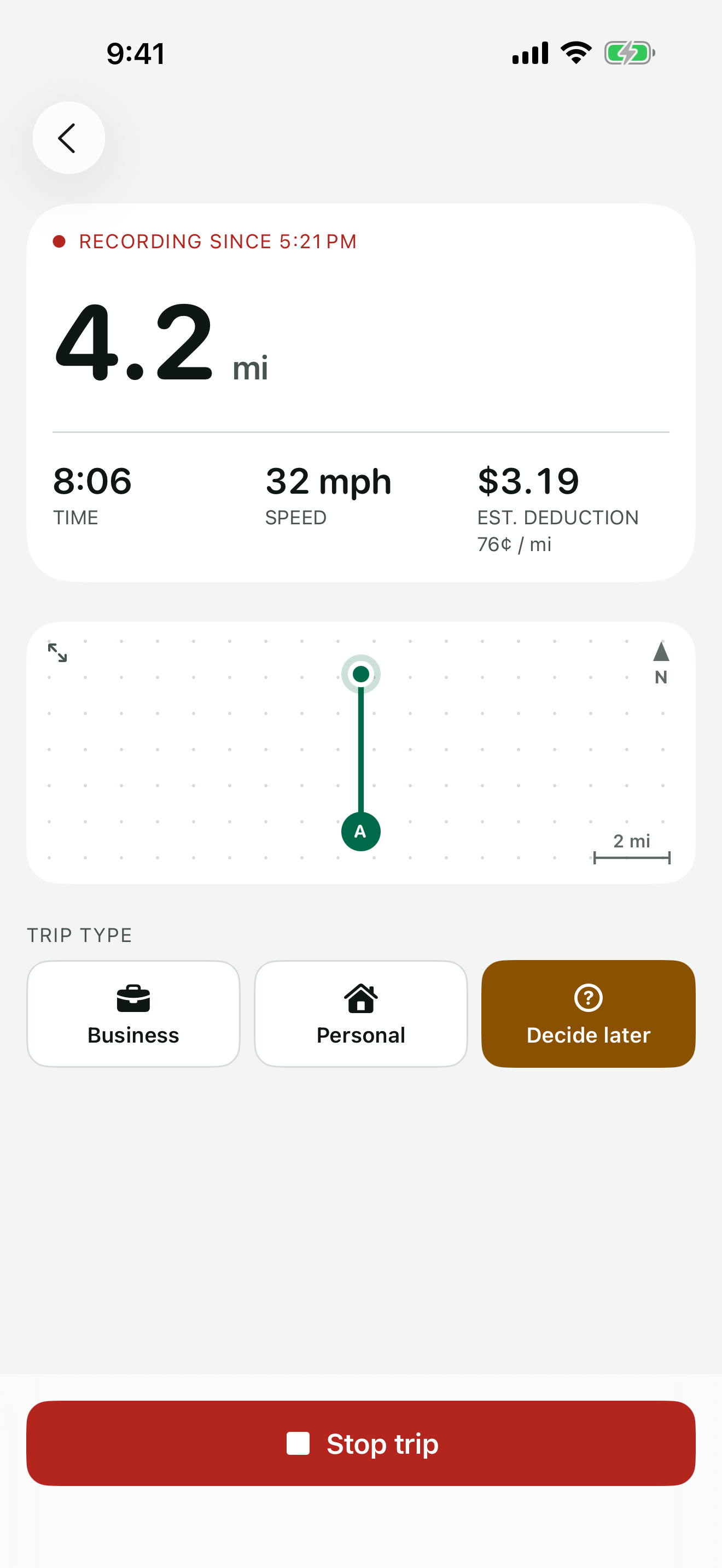
A trip recording: 4.2 miles, 8 minutes, estimated deduction $3.19 at 76¢ a mile
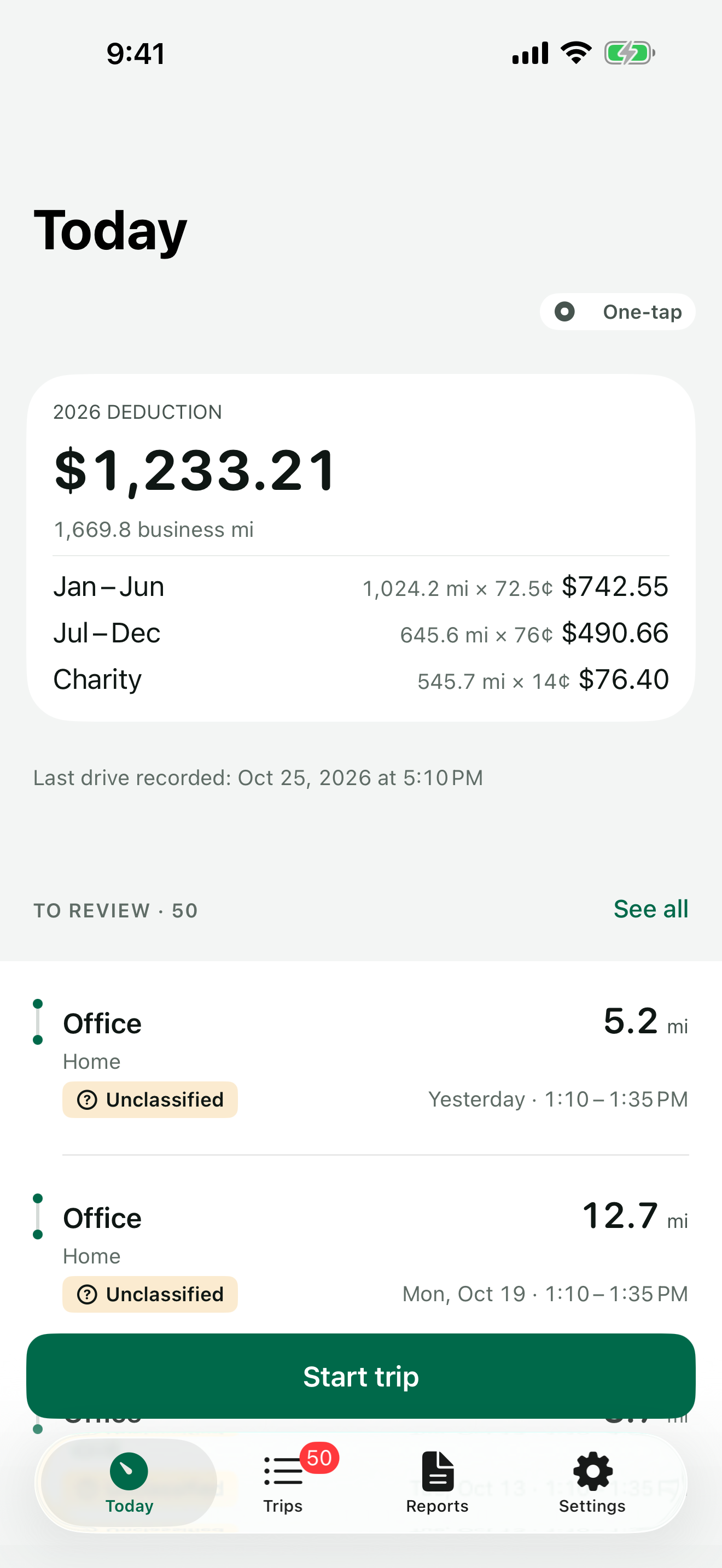
Today: 2026 deduction $1,233.21 for 1,669.8 business miles, split by rate period

Nothing slips through

One tap from the Lock Screen, a past trip in seconds, and a heads-up when your iPhone noticed a drive that never made it into the log.

A log you can hand over

Date, places, purpose and miles for every business trip, at the IRS rate for the day you drove. CSV for free, an annual PDF with Pro.

Your trips stay yours

No account and no server of ours. Your log lives on your iPhone, with a backup in your own iCloud.

How it works

Three moves. A whole year of miles.

  1. 1

    Tap Start when you pull out

    From the app, the Lock Screen, Control Center or Siri. Forgot? Add the trip later in seconds.

  2. 2

    Swipe to classify

    Right for business, left for personal. Add a purpose once and pick it next time.

  3. 3

    Hand over your log

    Export a CSV anytime, or create the annual PDF report with Odometa Pro.

Record

One tap when you pull out.

Miles are measured as you drive, on your iPhone, and shown live on the Lock Screen and in the Dynamic Island.

  • Lock Screen and Dynamic Island. A Live Activity shows miles and time while the trip records.
  • Control Center and Siri. Start or stop a trip without opening the app.
  • A past trip in seconds. Pick two places and the distance is measured between them.
  • Or let it record for you. With Odometa Pro, drives are recorded without a tap. You decide when recording is on. PRO
  • Shift mode for deliveries. One recording for the whole shift — stops don’t end it.
Trip recording screen with miles, time, speed, estimated deduction and trip type buttons
Classify

Swipe right for business.

Left for personal. A week of driving is classified in a couple of minutes — or by itself.
  • Purposes you reuse. Type a purpose once and pick it next time.
  • Named places. Name a place and every trip there shows its name.
  • Clients. Assign trips to a client and see business miles by client.
  • Many at once. Select trips and mark them in one go.
  • Rules. Trips to a place or at set hours are marked as soon as they end. PRO
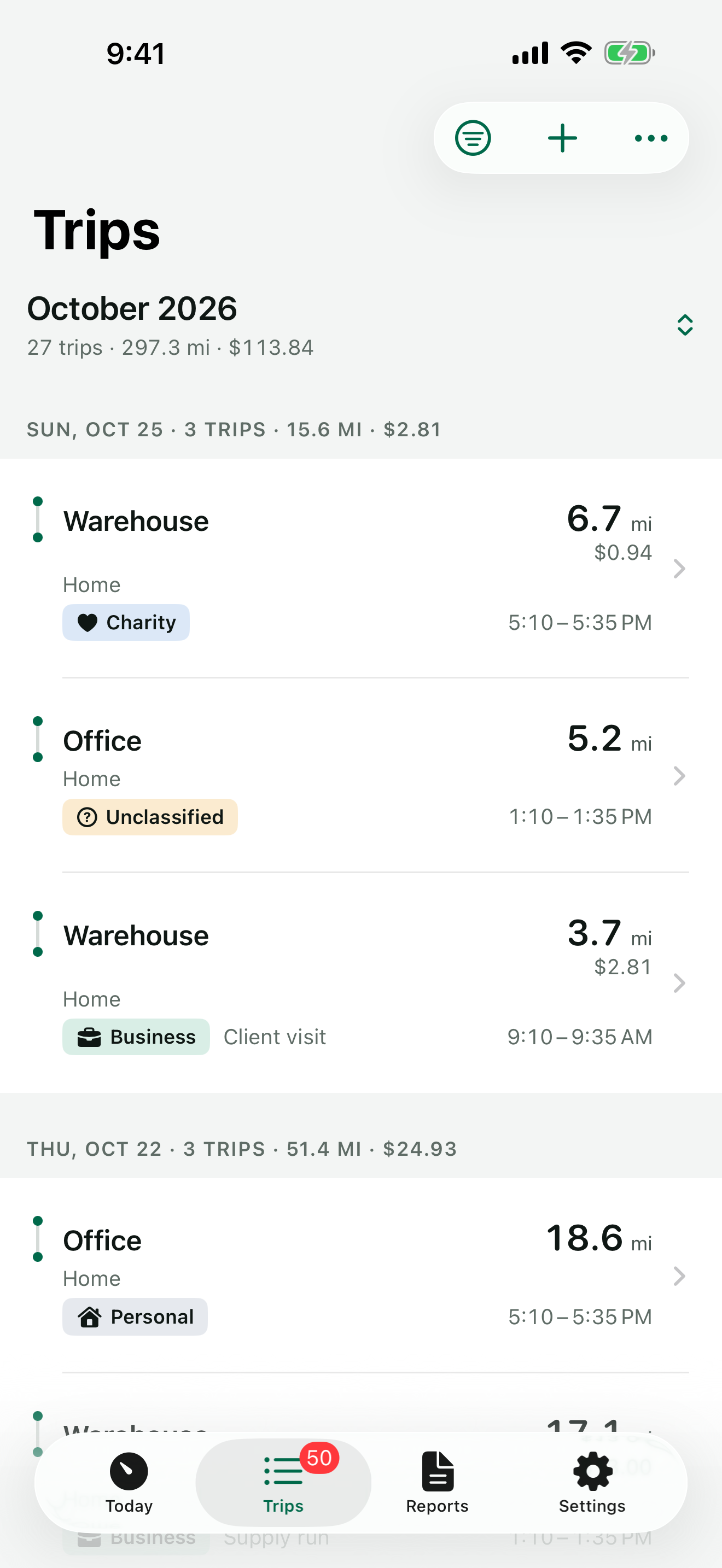
Trips journal grouped by month and day, with miles, deduction and trip type chips
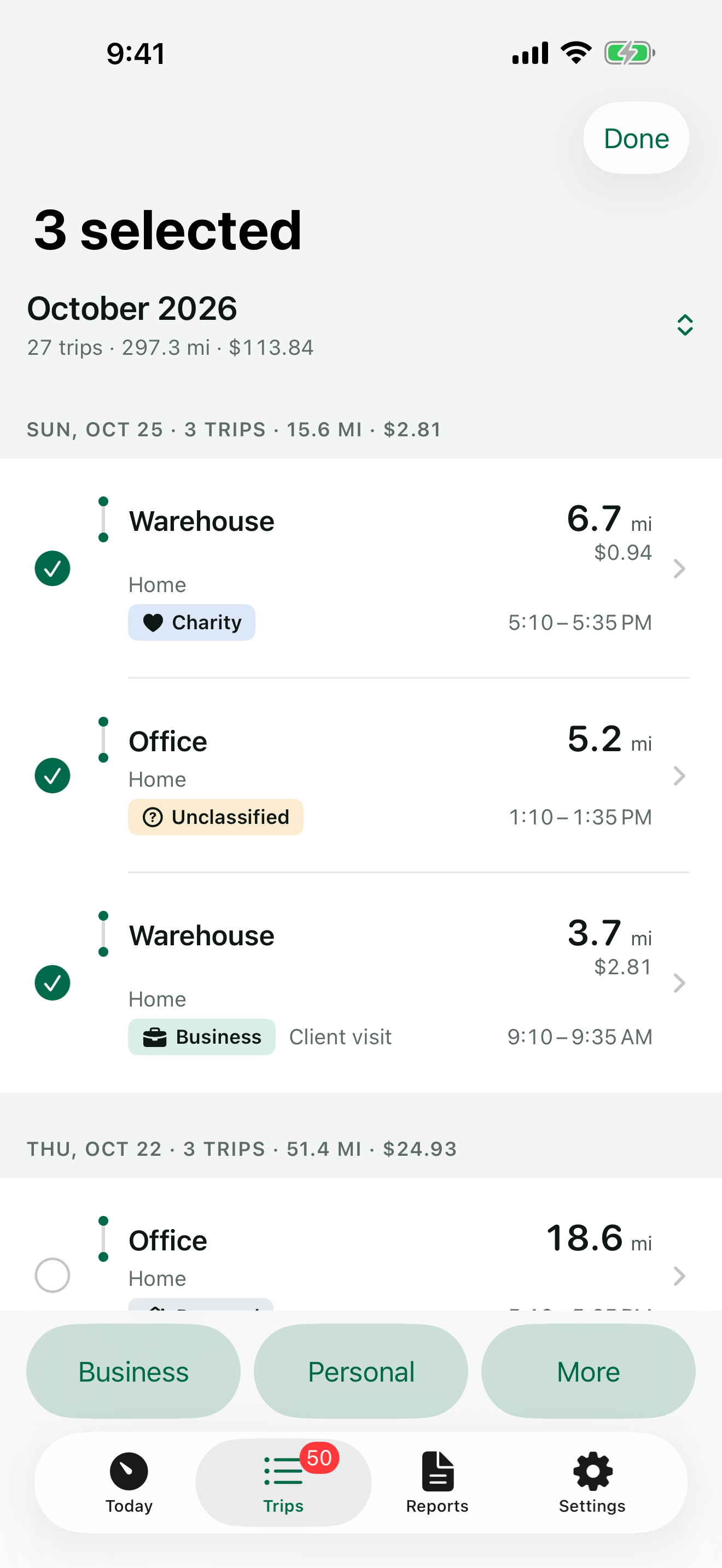
Three trips selected, with Business, Personal and More buttons at the bottom
Every trip

Where you went, stop by stop.

Each trip shows where it started, where it stopped and where it ended — with the miles and minutes in between.
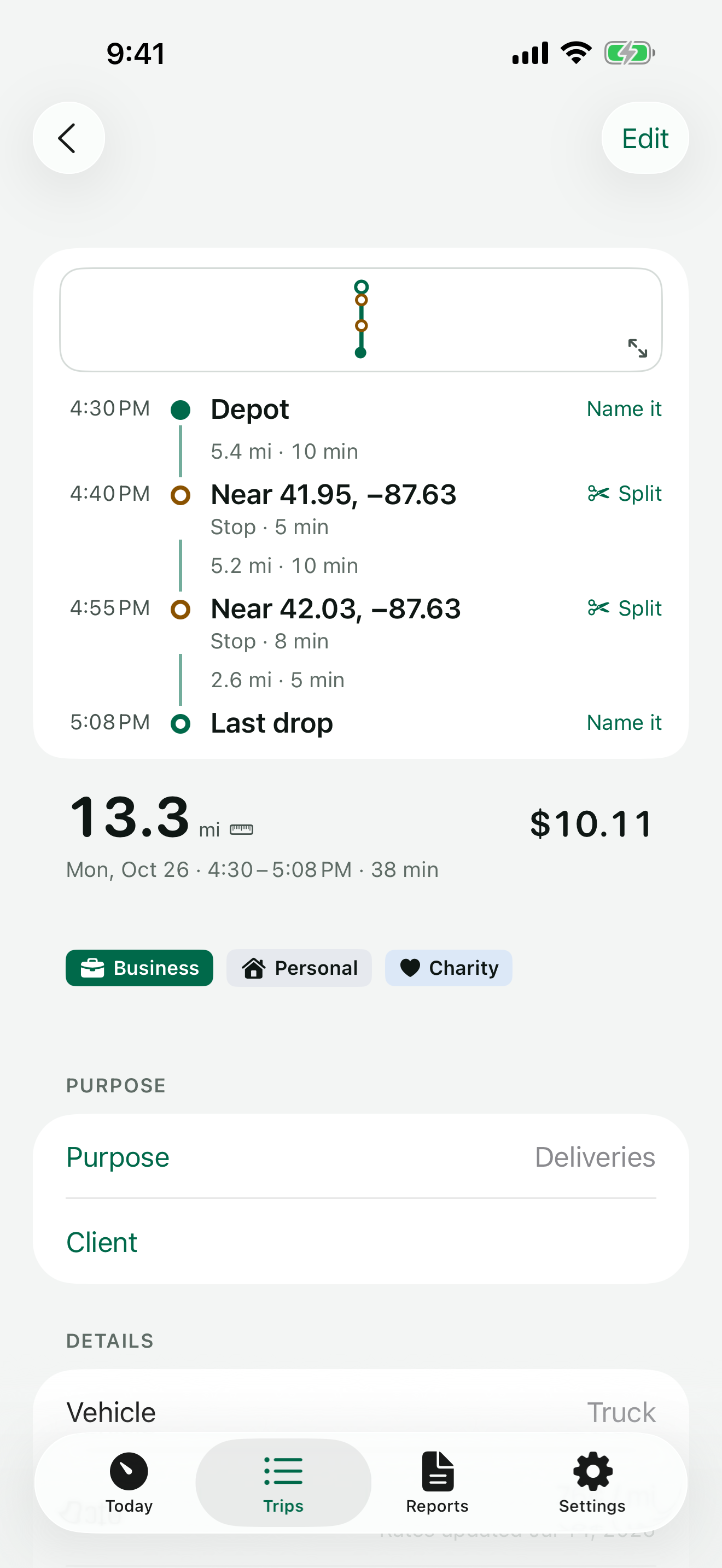
  • Split at a stop. Two errands in one drive become two trips. Undo anytime.
  • Merge with the next trip. A fuel stop doesn’t have to break a drive in two.
  • Route sketch, map on request. The route is drawn on your iPhone. Apple Maps loads only if you turn on Show maps.
  • Recently deleted. A deleted trip waits 30 days before it’s gone.
Trip card: Depot, two stops and Last drop with miles and minutes between them, 13.3 miles, $10.11
Nothing slips through

Silence is never “all good”.

If recording stops, Odometa tells you. If your iPhone noticed driving and no trip was recorded, you see when it happened and can add it.

  • Possibly missed drives. Driving from your iPhone’s motion history, matched against your log. Free.
  • A watchdog for recording. A daily check, and a notification if drives may not be recording.
  • One reminder a day when trips are waiting to be marked. You pick the hour.
  • Honest marks. Estimated distance and edits made by hand are always marked — in the app and in your report.
The rate

The rate for the day you drove.

Your deduction is calculated with the IRS standard mileage rate that applied on the date of each trip. When the rate changes during the year, earlier trips keep the earlier rate.
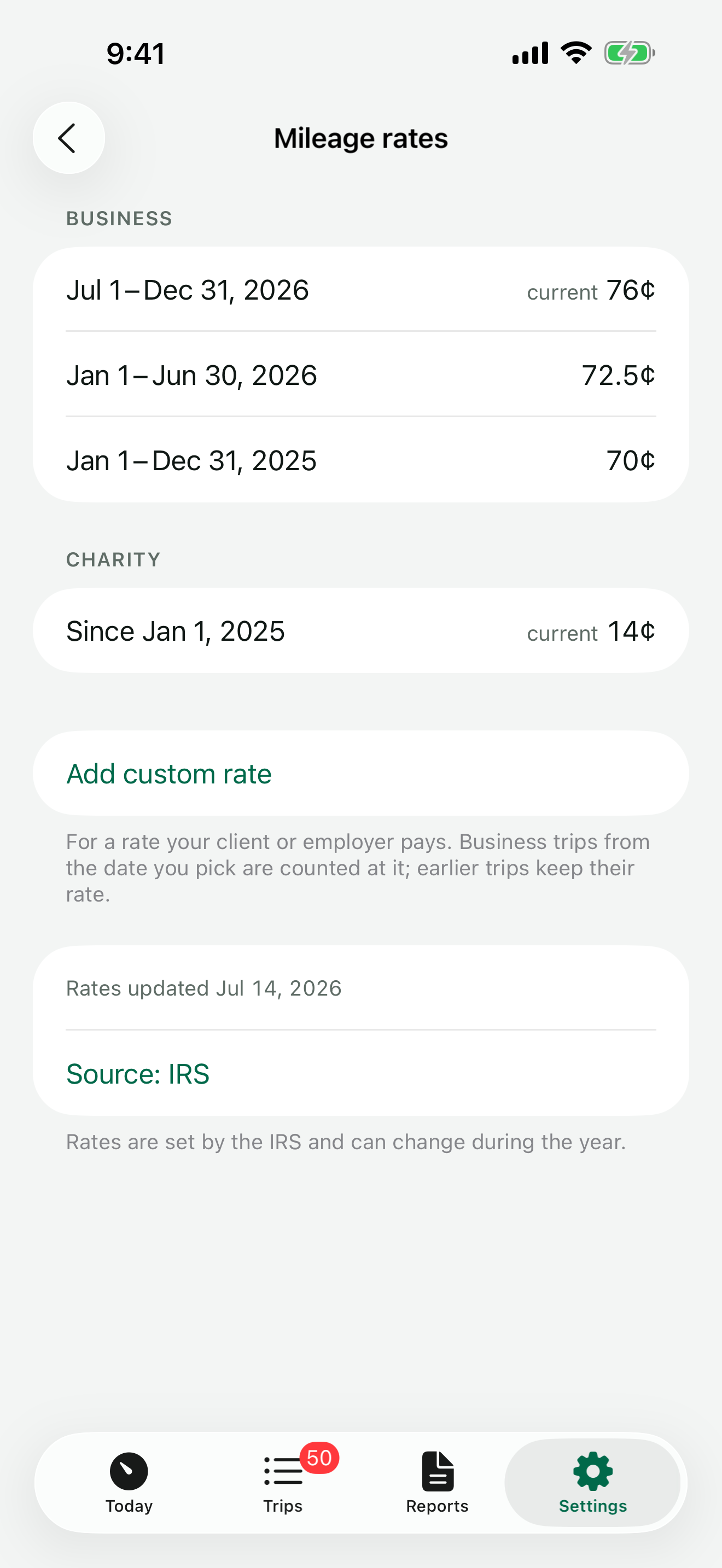
2026 deduction$1,233.21
Jan 1 – Jun 301,024.2 mi × 72.5¢$742.55
Jul 1 – Dec 31645.6 mi × 76¢$490.66
Charity545.7 mi × 14¢$76.40
  • Your own rate for a client or employer who reimburses, from the date you pick. Earlier trips keep theirs.
Mileage rates: 76¢ from July 1, 2026, 72.5¢ for January to June 2026, 70¢ for 2025, charity 14¢
Reports

A log you can hand over.

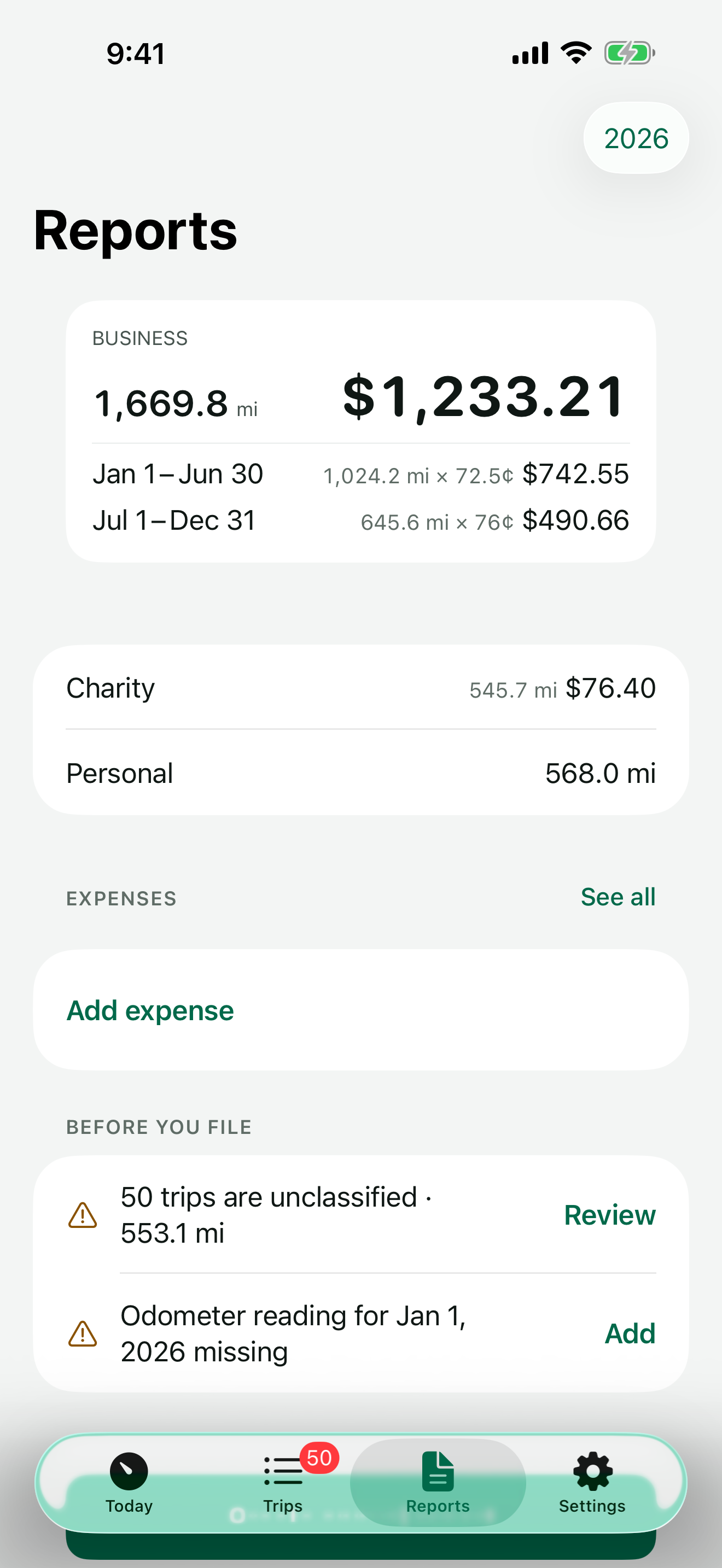
Each business trip has its date, start, destination, purpose and miles. Odometa checks every file before it lets you send it.
  • CSV for free, anytime. Opens in Numbers and Excel. You see what’s in the file before you share it.
  • Counted from the file itself. Every export is read back and checked against your log.
  • Monthly and yearly, with totals by purpose.
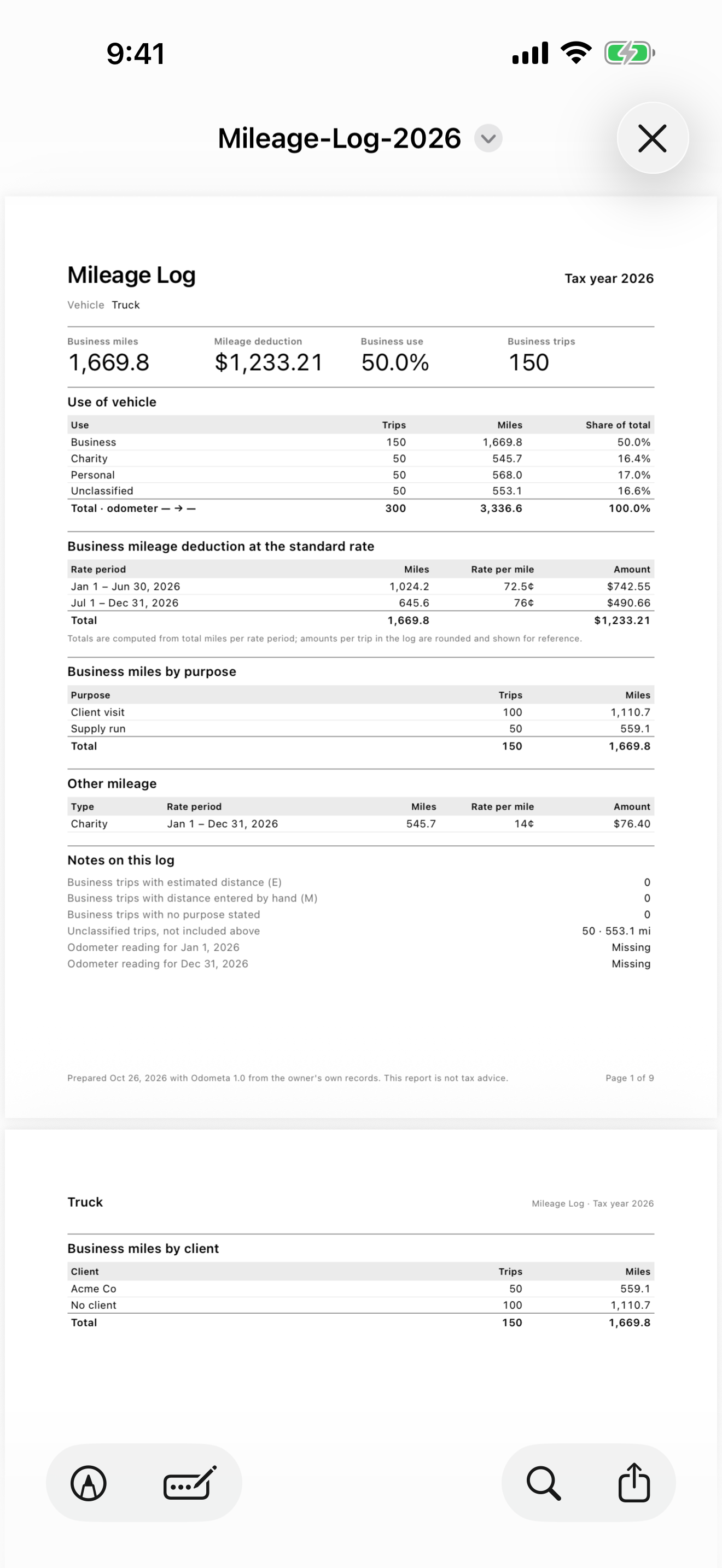
  • Annual PDF report with odometer readings, totals for each rate period and every trip. PRO
  • Any dates, one client or one vehicle, with expenses and receipts attached. PRO
  • Before you file. Unclassified trips and missing odometer readings are listed, each with a fix.
Reports: business miles and deduction by rate period, charity, personal, expenses and checks before you file
The annual PDF mileage log: summary, use of vehicle, deduction by rate period and miles by purpose
And everything around the trip

Receipts, vehicles, widgets.

Expenses and receipts

Log parking, tolls and supplies with a photo of the receipt, next to the trip. With Pro, the amount, date and merchant are read from the photo — on your iPhone.

Vehicles and odometer

Odometer readings for the start and end of the year, and the share of business use for each vehicle. More than one vehicle with Pro.

Widgets, Siri and Control Center

Your deduction and the trips waiting to be marked on the Home Screen. Start and stop a trip from Control Center or with Siri.
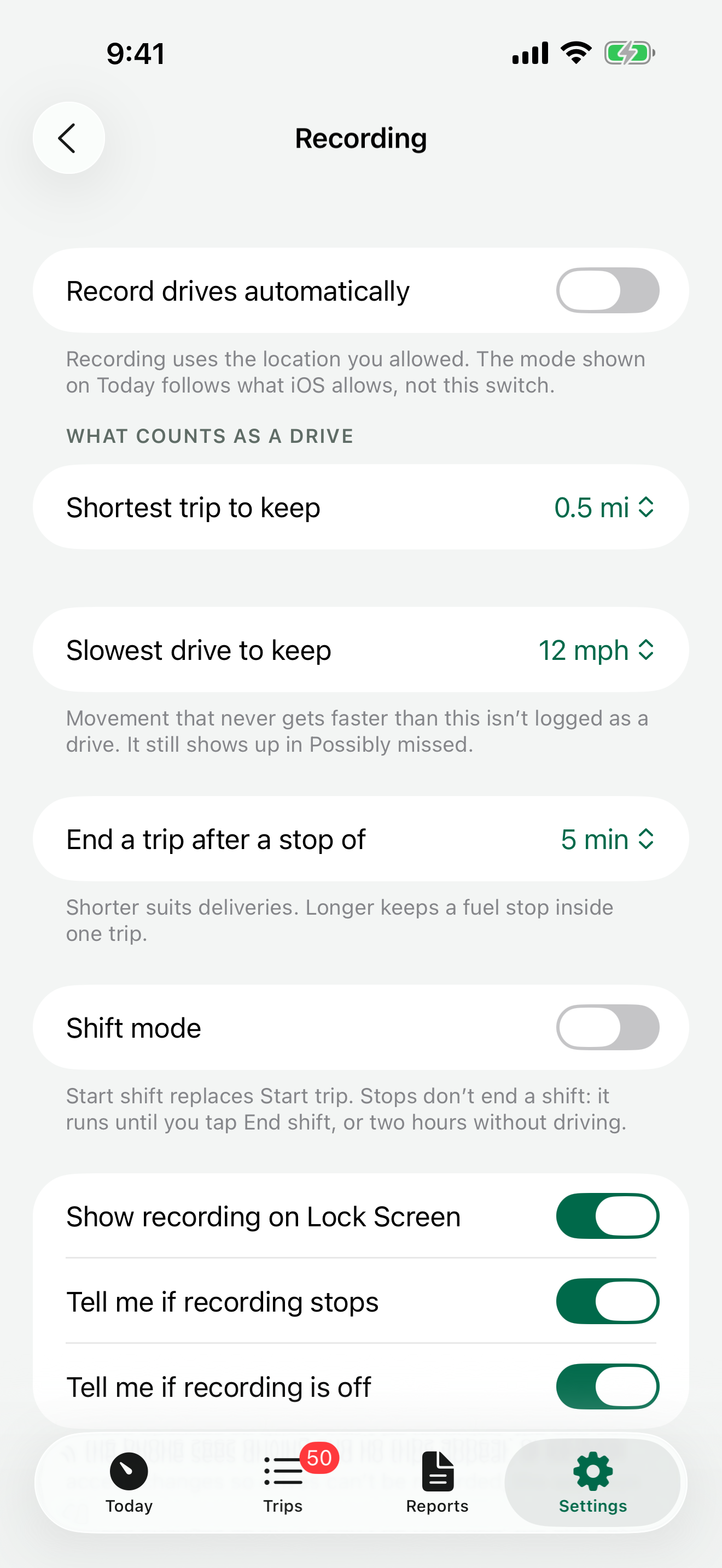
Tuned to how you driveShortest trip to keep, slowest drive, how long a stop ends a trip.
Filters and monthsType, period, vehicle, distance, purpose — and a jump to any month.
Offline road mapsWhere Apple Maps has no route, download a region and measure on your iPhone.
Backups you controlA daily copy in your iCloud, a backup file, and everything as spreadsheets.
Built for everyoneVoiceOver and the largest text sizes, light and dark.
English, Spanish, RussianThe app speaks three languages. Reports stay in English for the IRS.
Recording settings: automatic recording, shortest trip to keep, slowest drive to keep, end a trip after a stop, shift mode

Recording settings. What counts as a drive, shift mode and recording alerts.
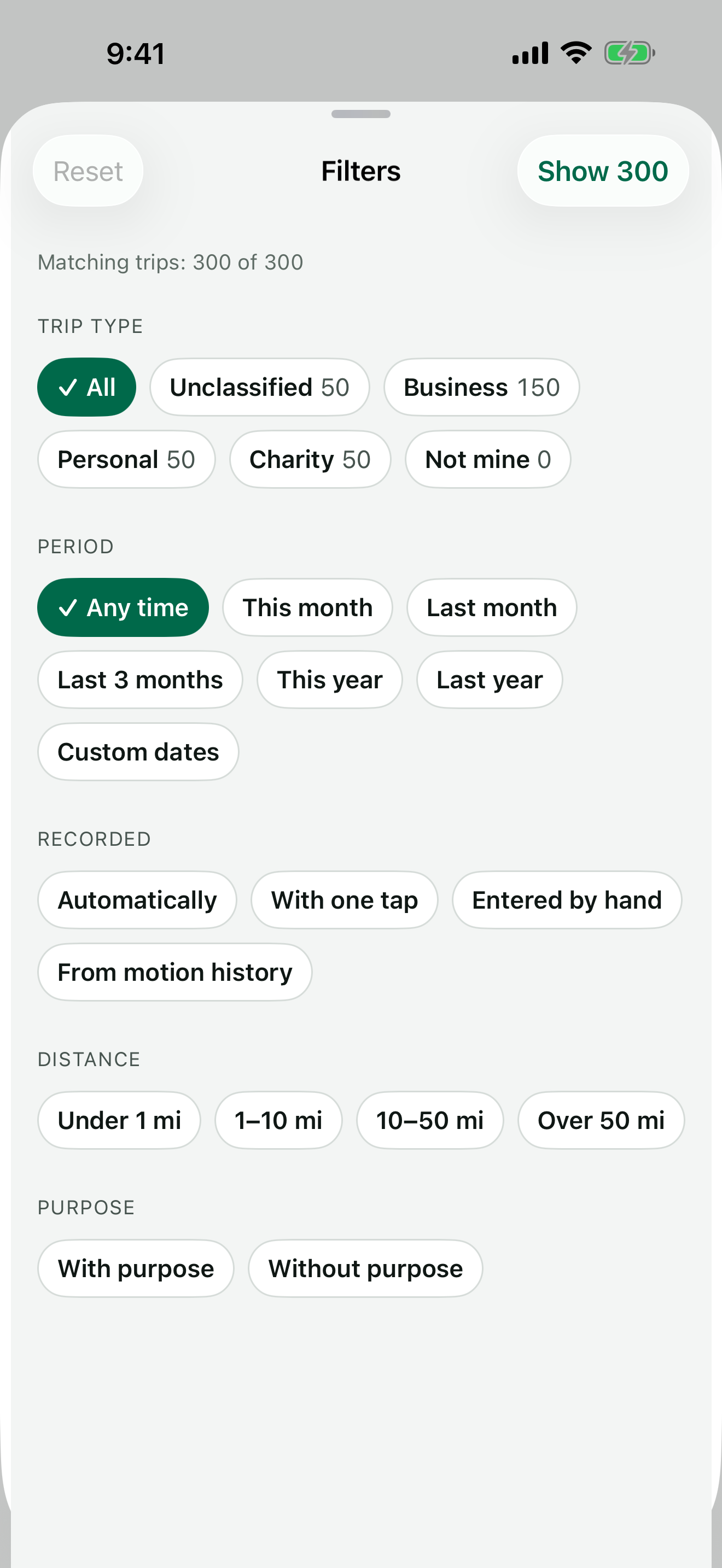
Trip filters: type, period, vehicle, how recorded, distance and purpose

Filters. Any trip in a year of driving, in two taps.

Privacy

Your miles. Your phone. Your log.

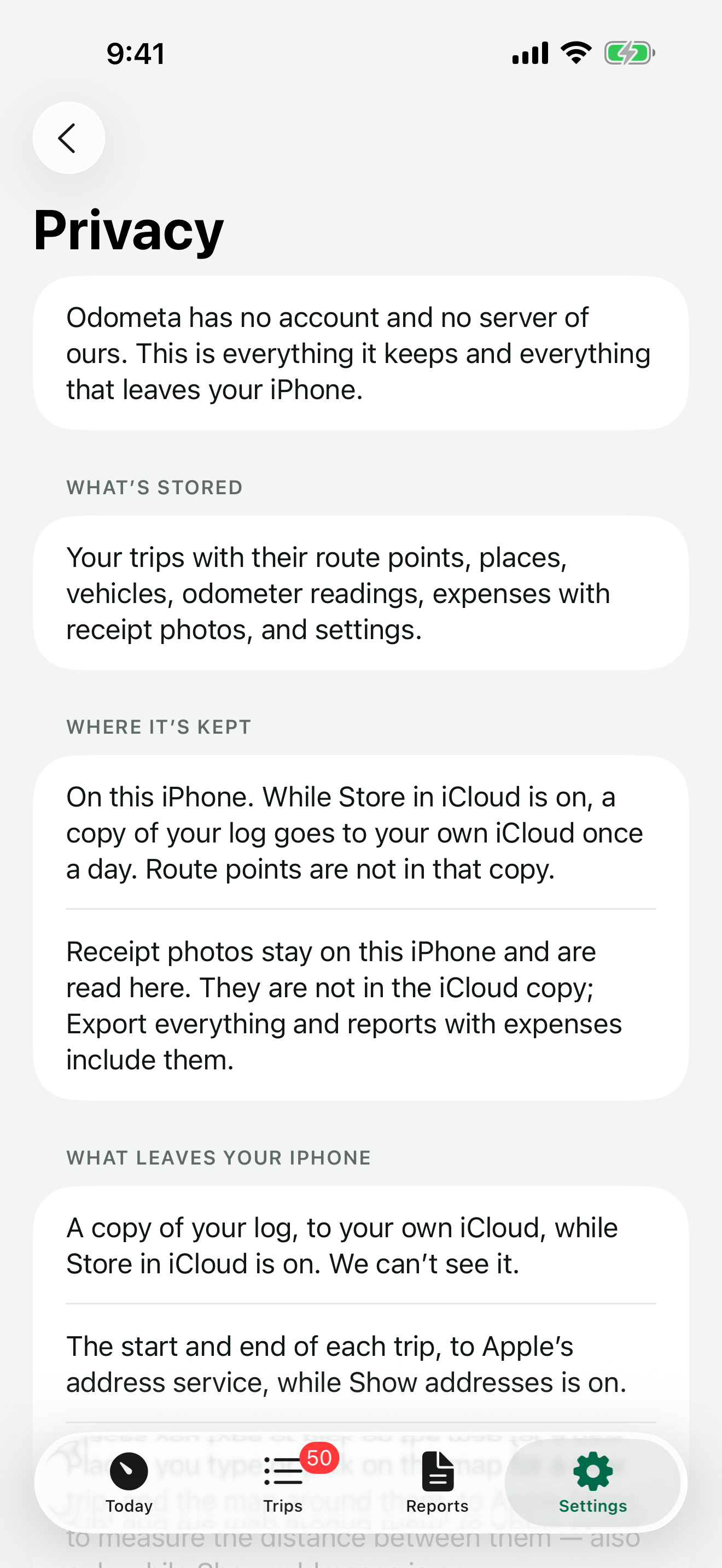
Odometa has no account and no server of ours. Your trips are stored on your iPhone and backed up to your own iCloud — and you can turn that off.
  • No account, no sign-in. Everything works from the first launch.
  • No analytics, no ads, no third-party code.
  • Only what’s needed leaves your iPhone. The start and end of a trip go to Apple’s address service, and you can turn that off. Your route in between doesn’t.
  • Delete everything whenever you want.

Read the privacy policy

Privacy screen in the app: what’s stored, where it’s kept and what leaves your iPhone
Pricing

Free to log. Pay once for Pro.

Or pay by the year. The one-time purchase will always be offered.

Free

$0

Everything you need to keep the log. No trip limit, no time limit.

  • Unlimited trips
  • One-tap recording, Live Activity
  • Missed-drive alerts
  • Swipe to classify, purposes, places
  • Deduction at the IRS rate for each day
  • Your own reimbursement rate
  • Expenses with receipt photos
  • CSV export, monthly and yearly
  • iCloud backup and restore
  • Widgets, Siri, Control Center

Prices in the US App Store. The yearly subscription renews automatically unless canceled at least 24 hours before the end of the period.

Questions

Straight answers.

Is this approved by the IRS?

The IRS doesn’t approve apps. Odometa records what the IRS asks a mileage log to contain: the date, the places, the business purpose and the miles of each trip.

Will my log hold up in an audit?

No app can promise that. Odometa marks estimated distance and edits made by hand, so your log shows what was measured and what wasn’t. Talk to a tax professional about your situation.

Does it record where I go all the time?

Only if you turn on automatic recording. Otherwise location is used only while a trip you started is recording.

Where is my data?

On your iPhone, with a backup in your own iCloud. There is no account and no server of ours.

Can I keep everything off iCloud?

Yes. Turn off Store in iCloud in Settings › Data. The app then writes nothing to iCloud, and you choose whether the copies already there are deleted.

What if I lose my phone?

Your log is backed up to your iCloud once a day. On a new iPhone the app offers to restore it. Route points are not part of the backup; trips keep their miles and places.

Does anything about my trips go to Apple?

The start and end of a trip, to look up the address — your route in between doesn’t. Maps are loaded only if you turn on Show maps. You can turn address lookup off and name places yourself.

Will my price go up?

Not while you stay subscribed. If the yearly price changes, it changes for new subscribers only. And Pro is also a one-time purchase — that option will always be offered.

What happens if my subscription ends?

Your trips stay, and so do CSV export and backups. Pro features such as the PDF report and automatic recording are turned off until you renew.

Does it work for employees?

It records trips and exports them, and you can set your own rate for reimbursements. It doesn’t handle employer approval.

Can I use actual expenses instead of the standard rate?

The deduction is calculated with the standard mileage rate. You can log parking, tolls and other expenses next to your trips and include them in reports.

Kilometers? Android? iPad?

Miles only — the app is built around US tax rules. iPhone only, with iOS 26 or later.

Something else? Write to us from the app, in Settings › About › Contact support — every message is answered.

Every business mile is worth 76¢.

The IRS business rate since July 1, 2026. Start your log today.